
Automatic placement
The system reads the walk itself and registers each frame against the drawing, without QR codes on columns or manual tagging afterward.
How it works: locate
Footage without a position is just video. Oblix places each captured frame on your drawings automatically, so the record is organised the way your project is: by location.
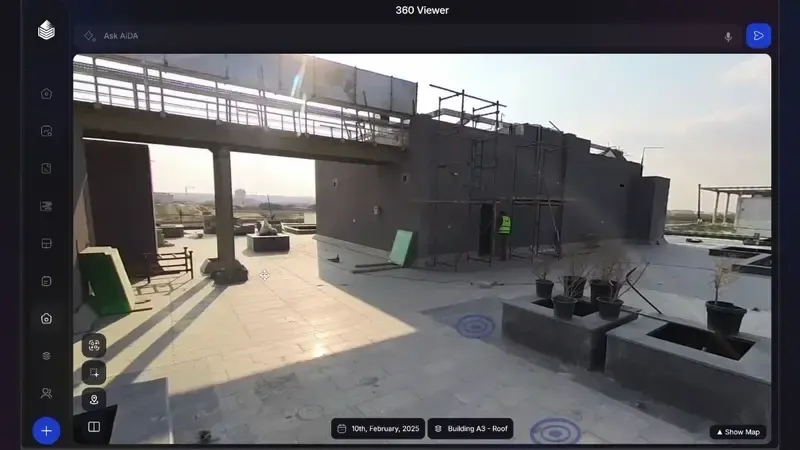
The system reads the walk itself and registers each frame against the drawing, without QR codes on columns or manual tagging afterward.
Click a room on the plan and stand in it. The plan is the index, the way engineers actually think about a building.
Because every frame has a position, any two dates can be compared from the same viewpoint. Progress claims stop being a matter of camera angle.
Current architectural or structural plans are enough. Revisions are swapped in without losing the history captured against earlier issues.
Why it matters
A photograph proves something happened; a located photograph proves where. Payment applications, variation disputes and handover documentation all turn on the second kind.
Positioning is also what lets the later stages work at all: reconstruction needs to know where frames were taken, and progress measurement needs to attribute work to zones. Locate is the hinge of the pipeline.
Questions
No. Positioning is computed from the imagery and the drawings, so there is nothing to stick to walls or maintain between walks.
Standard PDF or DWG floor plans. If the design is revised, the new issue is loaded and the record continues without interruption.
Accurate enough to stand in the same doorway on two dates and compare like for like. That is the standard the record is built to serve.
A 20-minute walkthrough of Oblix on a real project. No slides, no obligation.